Dashboard
Updated Oct 18, 2026
Overview
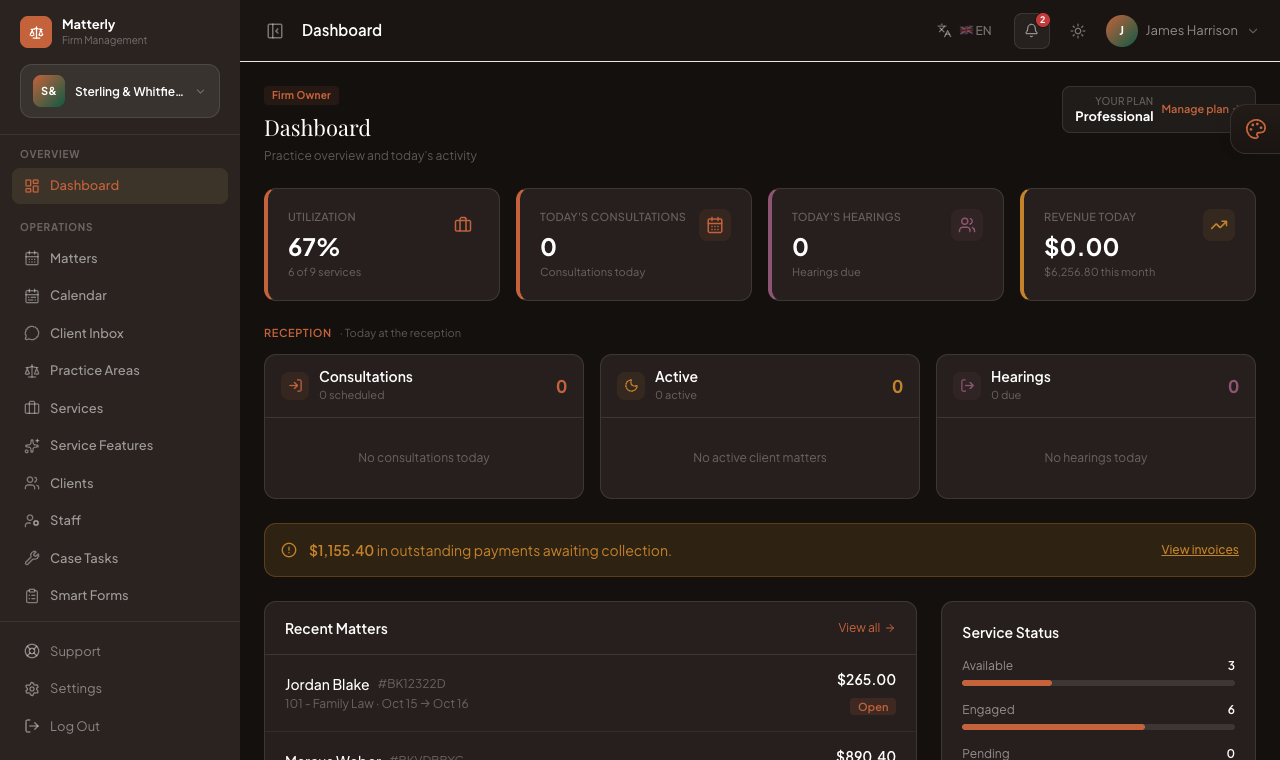
The Firm Admin Dashboard (/admin/dashboard) shows today’s practice activity.
Features
- Active matters (confirmed or in progress)
- Today’s consultations and hearings
- Revenue today, with month-to-date context
- Reception day sheet: consultations, active matters and hearings at a glance
- Outstanding payments awaiting collection
- Recent matters list
- Your plan, with a shortcut to manage it
- Quick actions
Reception day sheet
Below the summary cards, three columns show what reception is handling today:
| Column | Shows |
|---|---|
| Consultations | Consultations scheduled for today |
| Active | Matters currently active for a client |
| Hearings | Hearings due today |
Click any row to open the matter.
What information is displayed
| Card | Meaning |
|---|---|
| Active Matters | Matters that are confirmed or in progress |
| Today’s Consultations | Consultations scheduled for today |
| Today’s Hearings | Hearings due today |
| Revenue Today | Revenue recorded today, with the month-to-date figure beneath |
| Recent Matters | Latest matters with status badges |
Actions
- View all matters
- + New Matter / + New Client
- Open the Case Tasks board
- Jump to Smart Forms or AI Tools
Notes
Tip: When a Super Admin is impersonating a firm, an orange banner appears at the top. Use Exit Impersonation to leave.
Best Practices
- Start the day on the Dashboard to see what reception is handling.
- Clear completed case tasks so the caseload figures stay accurate.