Booking Payments
Updated Oct 18, 2026
Slotara supports online payment collection at the time of booking, as well as offline payment recording by staff. Payment is intentionally separated from Slotara's SaaS subscription billing — each tenant uses their own gateway credentials.
Pay-at-booking flow
Client confirms booking
    └─► Booking created (payment_status = pending)
    └─► Amount > 0 AND tenant requires payment?
            YES → redirect to gateway checkout
            NO  → instant confirmation (emails + SMS dispatched)

Payment gateway webhook
    └─► BookingPaymentService::markPaid()
            ├─► payment_status = paid, paid_at = now()
            ├─► BookingNotificationService::dispatchForNewBooking()
            └─► SyncBookingToGoogleCalendar (queued, if enabled)

Client redirected to success page
Supported gateways
| Gateway | Best for |
|---|---|
| Stripe | Global businesses, all currencies |
| Razorpay | INR payments, South Asia |
| PayPal | Global PayPal users |
| Paddle | Digital goods, SaaS-style billing |
| Paystack | Nigeria, Ghana, South Africa & pan-African payments |
Tip: When Require payment at booking is on and a gateway is configured, the booking wizard's confirmation button reads Pay now (with the order total) instead of Confirm booking, so customers know a payment step is coming.
Tenant setup
- Go to Manage → Integrations → Payments
- Enable Online payments
- Optionally enable Require payment at booking — when on, confirmation emails/SMS are sent only after payment succeeds
- Click your preferred gateway card (Stripe, Razorpay, PayPal, Paddle, or Paystack) — only that gateway's API fields are shown
- Enter the API credentials for the selected gateway
- Register the webhook URL in your gateway dashboard:
| Gateway | Webhook URL |
|---|---|
| Stripe | https://yourdomain.com/stripe/webhook |
| Razorpay | https://yourdomain.com/razorpay/webhook |
| PayPal | https://yourdomain.com/paypal/webhook |
| Paddle | https://yourdomain.com/paddle/webhook |
| Paystack | https://yourdomain.com/paystack/webhook |
Note: Paystack signs webhooks with an HMAC-SHA512 signature derived from your Secret Key, so no separate webhook secret is needed — the same Secret Key used for API calls also verifies incoming events. On the customer's return from Paystack, the transaction is additionally verified server-side by reference before the booking is marked paid.
Offline payments
Staff with booking management access can record payments manually:
- Open a booking in Manage → Bookings → View
- Click the Payment action
- Select method: Cash, Card (in person), or Bank transfer
- Enter an optional reference number
- Save —
payment_statusis set topaidand notifications are dispatched if the booking was previously pending
Offline methods (Cash, Card terminal, Bank transfer) can each be toggled on or off in the Offline Payment Methods section of the payment settings page.
Print receipts
Every booking has a public receipt URL — no login required:
GET /booking/{cancellation_token}/receipt
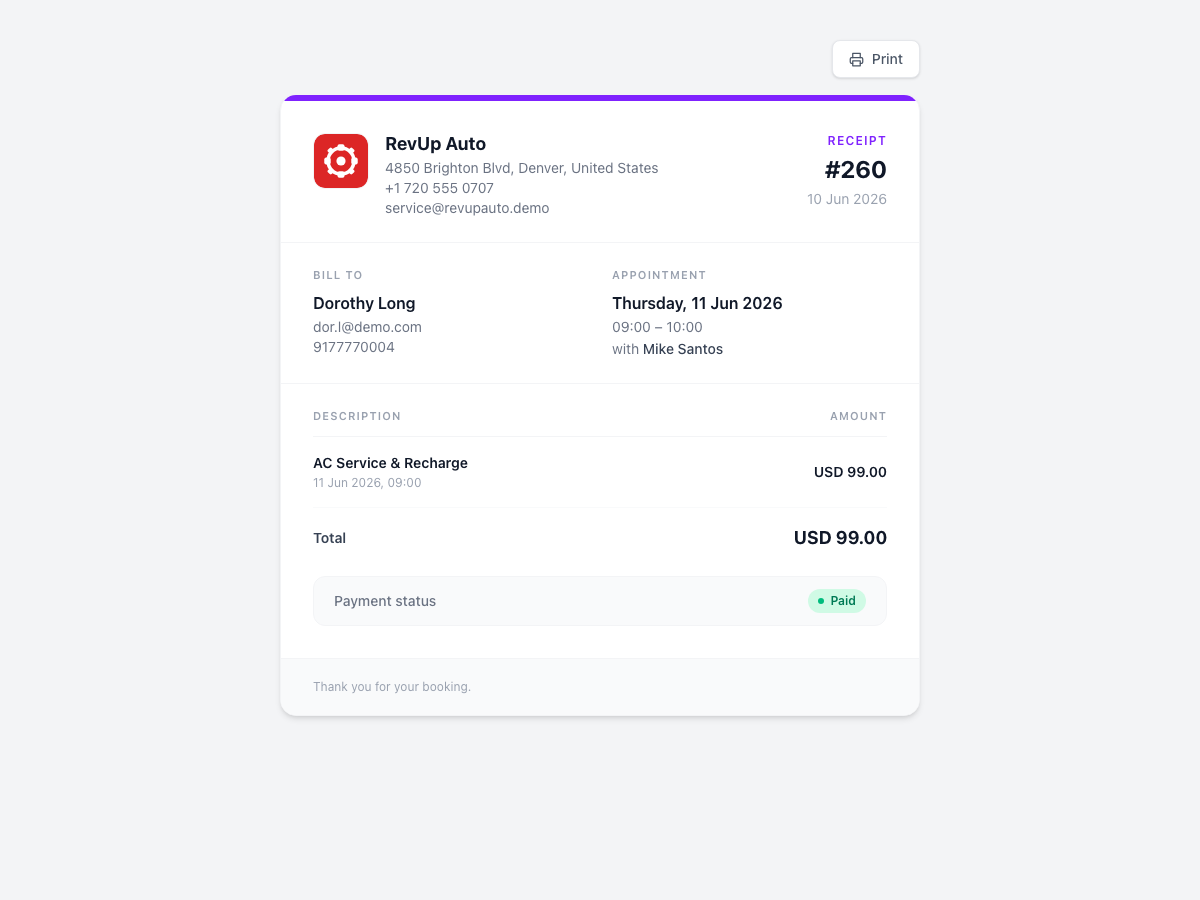
The page shows: business logo, name, and contact info; client name, email, and phone; appointment date/time and provider; service line items with total; payment status badge, gateway, reference number, and paid-at timestamp. A Print button is visible on screen but hidden when printing.
From the admin panel: Bookings → View → Print receipt opens the receipt in a new tab.
Important: separation from SaaS billing
| Booking payments | SaaS subscription billing | |
|---|---|---|
| Stripe keys | Tenant-configured (TenantPaymentSettings) |
Platform-configured (BillingService) |
| Webhook route | /stripe/webhook (metadata type: booking) |
/billing/stripe/webhook |
| Purpose | Client pays for service | Tenant subscribes to Slotara |
These two flows never share credentials or webhook handlers.
Key files
| File | Purpose |
|---|---|
app/Support/TenantPaymentSettings.php |
Settings accessor |
app/Services/BookingPaymentService.php |
Core payment logic, requiresPayment(), markPaid() |
app/Services/BookingNotificationService.php |
Dispatches emails/SMS after payment |
app/Contracts/BookingPaymentGateway.php |
Gateway interface |
app/Services/PaymentGateways/ |
Stripe, Razorpay, PayPal, Paddle, Paystack implementations |
app/Http/Controllers/PaystackWebhookController.php |
Paystack webhook (verifies HMAC per tenant / platform) |
app/Http/Controllers/BookingPaymentController.php |
Return/cancel URL handlers (verifies Paystack return) |
app/Http/Controllers/BookingReceiptController.php |
Receipt page |
resources/views/booking/receipt.blade.php |
Receipt view |
tests/Feature/BookingPaymentTest.php |
Feature test suite |
tests/Feature/OfflinePaymentTest.php |
Offline payment tests |