Features
Updated Oct 18, 2026
A complete look at everything Quizora includes out of the box.
AI Quiz Generation
Quizora's headline feature. Creators describe a topic in plain English, pick their preferences, and GPT-4o generates a complete quiz in seconds — streamed in real time, question by question.
What you configure per generation:
| Option | Choices |
|---|---|
| Topic / Prompt | Any text (e.g. "Indian History — Mughal Empire, intermediate level") |
| Question Type | MCQ Single, MCQ Multiple, True/False, Fill in the Blank, or Mixed |
| Difficulty | Easy, Medium, Hard, or Mixed |
| Number of Questions | 1 to 50 per generation |
| Options per MCQ | 2 to 6 options |
| Marks per Question | Set default marks and negative marks |
After generation, every question is editable. You can delete, reorder, or manually add questions before saving.
Works without AI too: Creators who don't want to use AI can build quizzes entirely by hand using the built-in question editor. AI is an accelerator, not a requirement.
Exam Interface
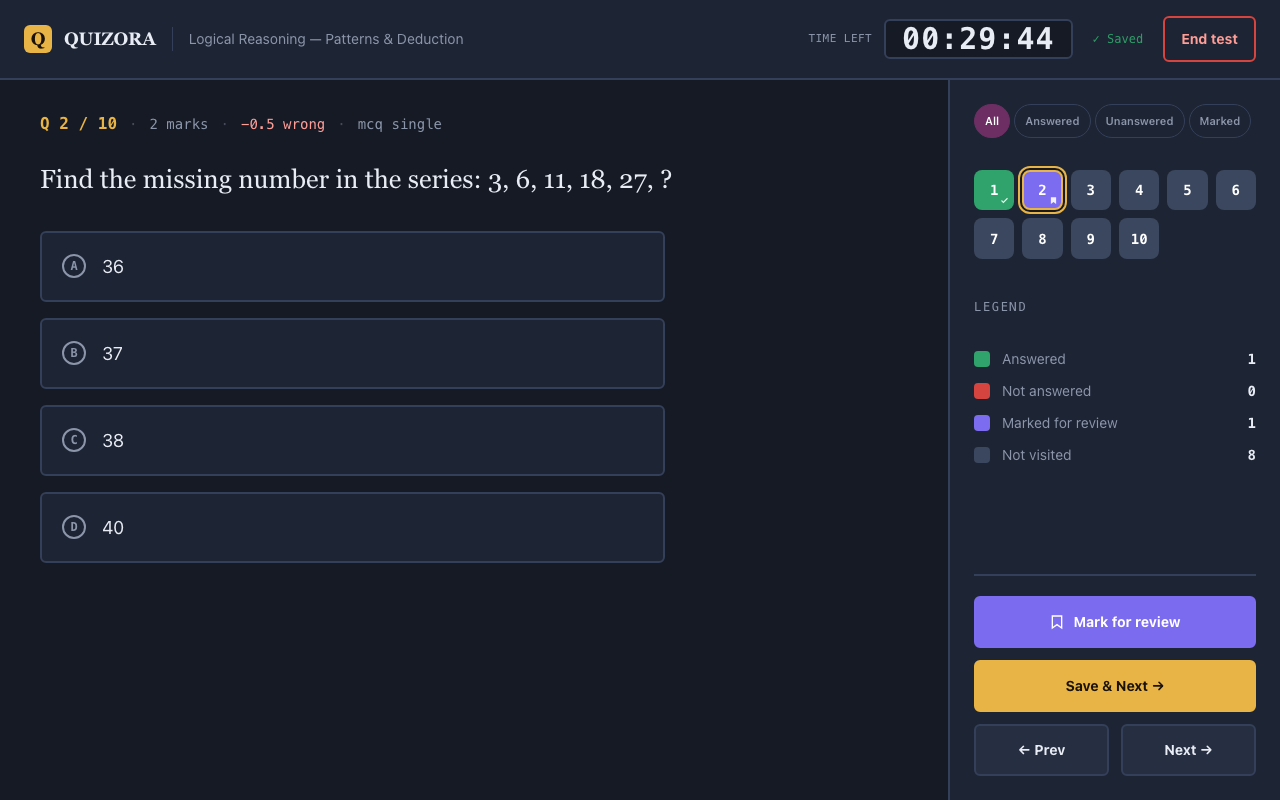
The exam panel is modelled after professional competitive exam interfaces — familiar to students who have taken timed online assessments.
Key elements:
- Question palette — numbered grid on the right showing all questions at a glance
- Colour coding — grey (unvisited), red (visited, not answered), green (answered), purple (marked for review), amber (answered + flagged)
- Countdown timer — shown prominently; auto-submits when it hits zero
- Mark for Review — flag any question to come back to it
- Auto-save — answers saved every 30 seconds automatically
Configurable per quiz:
| Setting | What It Does |
|---|---|
| Duration | Overall time limit (or none) |
| Per-question timer | Optional time limit per question |
| Shuffle questions | Different order per attempt (also an integrity measure) |
| Shuffle options | Randomised option order |
| Navigation restriction | (planned) Allow / prevent going back |
| Proctoring | Browser-based anti-cheat — see Anti-Cheating |
Question Types
| Type | Best For |
|---|---|
| MCQ — Single | Standard knowledge questions |
| MCQ — Multiple | "Select all that apply" questions |
| True / False | Concept checks |
| Fill in the Blank | Spelling, formulas, terminology |
Each question has:
- Rich text content — WYSIWYG editor with mathematical notation (KaTeX) and images, on both the question stem and individual answer options (v1.3.0 — see Rich Question Content)
- An explanation shown after the attempt (optional)
- Individual marks and negative marks values
- A per-question time limit (optional)
- A hint (optional — shown if creator enables it)
Scoring & Grading
- Scores are calculated immediately on submission
- Negative marking deducts marks for wrong answers (configurable per question, enabled per quiz)
- Final score is always
max(0, total)— never goes negative - Pass/fail determined by the quiz's pass percentage threshold
- Score, percentage, and pass/fail status stored with every attempt
Monetisation
Selling quizzes:
- Creators set a price per quiz
- Customers pay via Razorpay or Stripe at checkout
- Platform takes a configurable commission; creator keeps the rest
Subscription plans:
- You create plans (Free, Pro, Business) with different feature sets
- Monthly or yearly billing via Razorpay or Stripe subscriptions
AI credit monetisation:
- Each plan includes N free AI generations per period
- Creators top up their wallet with real money for additional generations
- Admin sets the per-generation charge
Creator payouts:
- Creators request withdrawals from their wallet
- Admin reviews and marks as paid
- Full transaction history for both parties
Certificates
| Feature | Detail |
|---|---|
| Auto-generation | Triggered immediately on passing a quiz |
| Format | PDF, downloaded in-browser |
| Personalisation | Student name, quiz title, date, score |
| Verification | QR code linking to a public verification page |
| Customisation | Edit the Blade template to change layout and branding |
Analytics
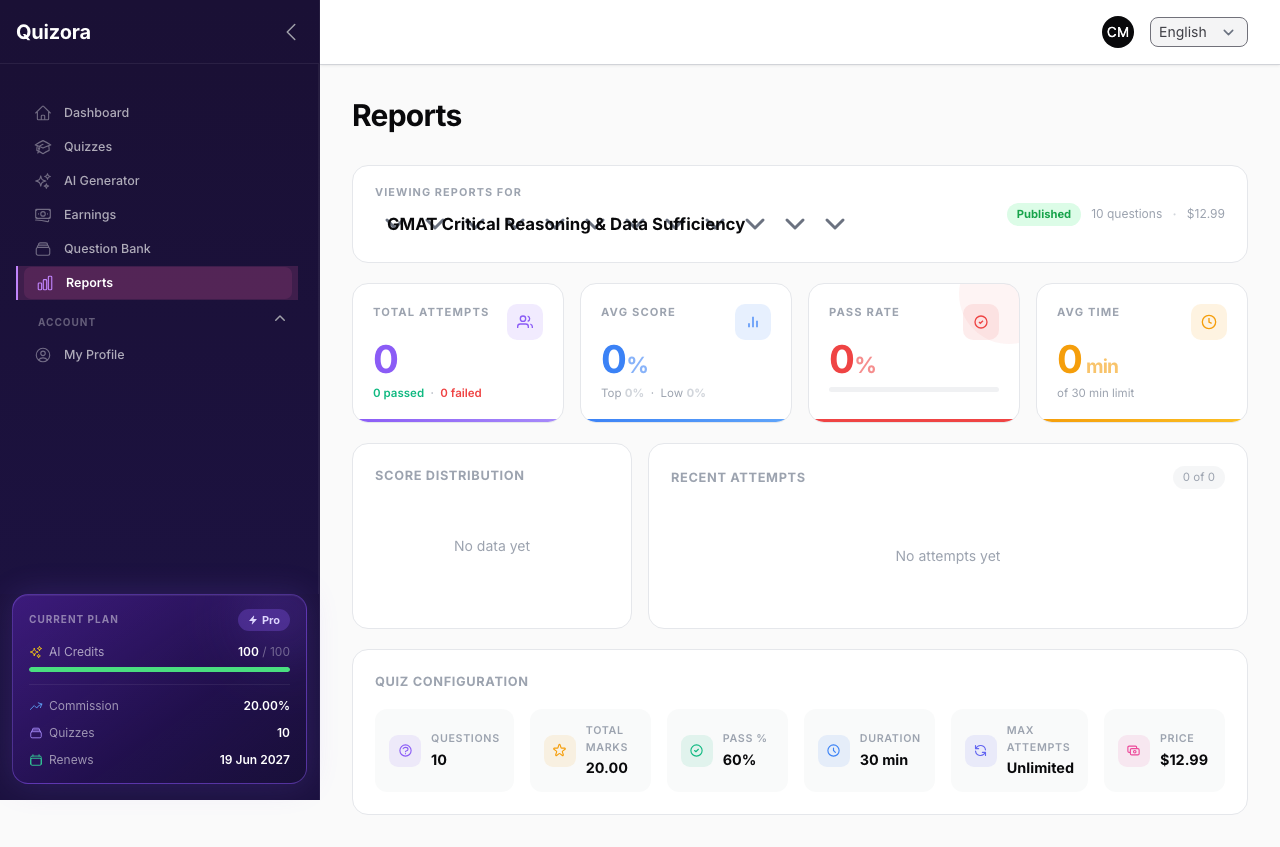
For creators:
- Attempt count and pass rate per quiz
- Score distribution chart
- Drop-off rate (started but didn't finish)
- Question-level wrong-answer rate
For admins:
- Platform-wide revenue by day/week/month
- Top creators by sales
- AI usage: generations per day, tokens, costs
- Failed job monitoring (queue health)
Multilingual Support
| Language | Status |
|---|---|
| English | ✅ Full |
| Hindi | ✅ Full |
| Arabic (RTL) | ✅ Full — complete right-to-left layout |
| Other languages | Add via lang/{code}/ folder |
- Language switcher in all three panels
- Admin, Creator, and Customer portals all fully translated
- RTL CSS foundation (Tailwind
rtl:variants) already in place
Three Separate Portals
| Portal | URL | Who Uses It |
|---|---|---|
| Customer Portal | / |
Students browsing, buying, and taking quizzes |
| Creator Panel | /creator |
Quiz creators managing their content and earnings |
| Admin Panel | /admin |
Platform owner managing everything |
Each portal has its own login, design, and feature set. A single user account can hold multiple roles simultaneously.
Platform Management
Admin capabilities:
- User management (activate, deactivate, change role, assign plan)
- Category management with icons and subcategories
- Full order history with refund actions
- Creator payout approval workflow
- AI generation log with full audit trail
- Platform settings (all configurable via UI — no file editing needed)
Visual Installer
No command-line setup required. The 6-step installer handles:
- Requirements check (with fix hints for anything missing)
- Database configuration (with live connection test)
- Application setup (name, URL, admin credentials)
- Mail configuration (with test send)
- Payment gateway keys (skippable)
- Migration + demo seed (everything created automatically)
Docker Deployment (v1.2.0)
Quizora ships with a production-ready Docker stack. See the Docker guide for full instructions.
| Service | Role |
|---|---|
app |
PHP-FPM 8.3 — runs Laravel |
web |
Nginx — serves the app on port 8080 |
mysql |
MySQL 8.0 database |
redis |
Cache, sessions, and queue driver |
queue |
Background jobs (payments, emails, certificates) |
Inline Quiz Question Manager (v1.2.0)
The creator quiz wizard Questions step includes:
- AI generation panel with streaming progress (same GPT-4o engine as the standalone AI Generator page)
- Question bank import with type, difficulty, and search filters
- Drag-and-drop reordering, inline edit modal, and per-question marks
- Include/exclude toggle for AI results before adding to the quiz
Rich Question Content (v1.3.0)
Questions are no longer plain text. Creators can author fully formatted content on both the question stem and each answer option.
- WYSIWYG editor — bold, italic, lists, tables, code blocks, and more
- Mathematical notation — write LaTeX (
$\frac{a}{b}$or a fraction button) and it renders as crisp math via KaTeX, in the exam panel and the result review - Images — upload images on the question stem and on individual answer options (image-based multiple choice)
- Explanations and hints support the same rich formatting
Security is built in: All rich content is untrusted (anyone can register as a creator on a self-hosted install). Every question, option, explanation, and AI-generated field passes through a strict HTML sanitizer (allowlist-based) on both save and render, blocking stored-XSS. SVG uploads and
data:URIs are rejected — onlypng,jpeg,webp, andgifimages are accepted.
Enrolled-Only Exams (v1.3.0)
Run private, invite-only exams where only enrolled students can attempt — regardless of whether the quiz is free or paid.
- Private visibility — the quiz is gated: no enrollment, no attempt
- Invite by email — add students individually; they claim their seat on first login
- Shareable join code — generate a code students enter to self-enroll
- CSV bulk import — enroll up to 200 students at once from a spreadsheet
- Enrollment manager — searchable list showing each student's status (invited / active), source, and enrolment date, with one-click removal
The exam engine enforces enrollment at start time and handles every edge case: not enrolled, pending invite, and revoked seat.
Anti-Cheating (v1.3.0)
Browser-based exam integrity, configurable per quiz. Enable proctoring and Quizora watches for common cheating signals during the attempt.
| Detector | Triggers on |
|---|---|
| Tab switch | Student switches browser tab or minimises the window |
| Fullscreen exit | Student leaves fullscreen after entering it |
| Copy / paste | Student copies or pastes exam content |
| Focus loss | Student alt-tabs to another application |
- Every event is logged to a per-attempt violation report the creator can review
- Configurable auto-submit — after N violations, the attempt submits automatically
- Shuffle questions and options are surfaced as integrity measures
- Warning toasts keep the student informed as violations accrue
Roadmap: Webcam / AI video proctoring is planned for a future release. v1.3.0 covers browser-based detection.
AI Result Analysis (v1.3.0)
The same GPT-4o engine that generates quizzes now interprets results — two products from one pipeline.
For students — personalised, post-attempt feedback:
- A summary of how they did
- Weak areas identified from the specific questions they missed
- Concrete, actionable study advice
For creators — aggregate insight across all attempts on a quiz:
- Overall performance summary
- Flagged questions (e.g. "62% missed Q7 — possibly ambiguous or mis-keyed")
- Recommendations to improve the assessment
Analysis is cached so it's generated once, runs off the request path (never blocks a result page), and degrades gracefully — if AI is unavailable, the result shows without advice and the failure is logged. All AI output is sanitized before storage.
Add-on Modules (v1.5.0)
Extend Quizora without touching its code:
- One-click add-ons from Admin → Configuration → Modules, with live install progress, updates and uninstall that keeps your data
- Sell add-ons per plan (or grant one to a single creator)
- Signed and isolated — only signed modules install, and a failing module is switched off on its own while exams and payments keep working
- Build your own with the documented module API and a downloadable example module (Module Development)